


Many Alpha users have noticed that the total points shown in the Daily Points table (covering the past 15 days) don’t always match their current points balance. To make point tracking easier, Alpha Points has added two new columns — "Points Expired" and "Points Consumed" — to the Daily Points table, so users can clearly review their point inflow and outflow. This article explains how to read your point details and addresses common questions.
**Please update the app to version 7.20.0 or above to view this feature. It is also available on the web version.
Gate Alpha Point Features
To begin with, it is important to understand what sets the Alpha Points system apart.
- Points consumed on a given day are deducted starting from the earliest points earned within the past 15 days.
- "Points Consumed" data is updated the next day after points are spent.
- "Points Expired" refers to the points earned 16 days ago (T–16) that have not yet been used.
This first-in, first-out points deduction system is designed to be more user-friendly, ensuring that all your points can be effectively used.
Example 1
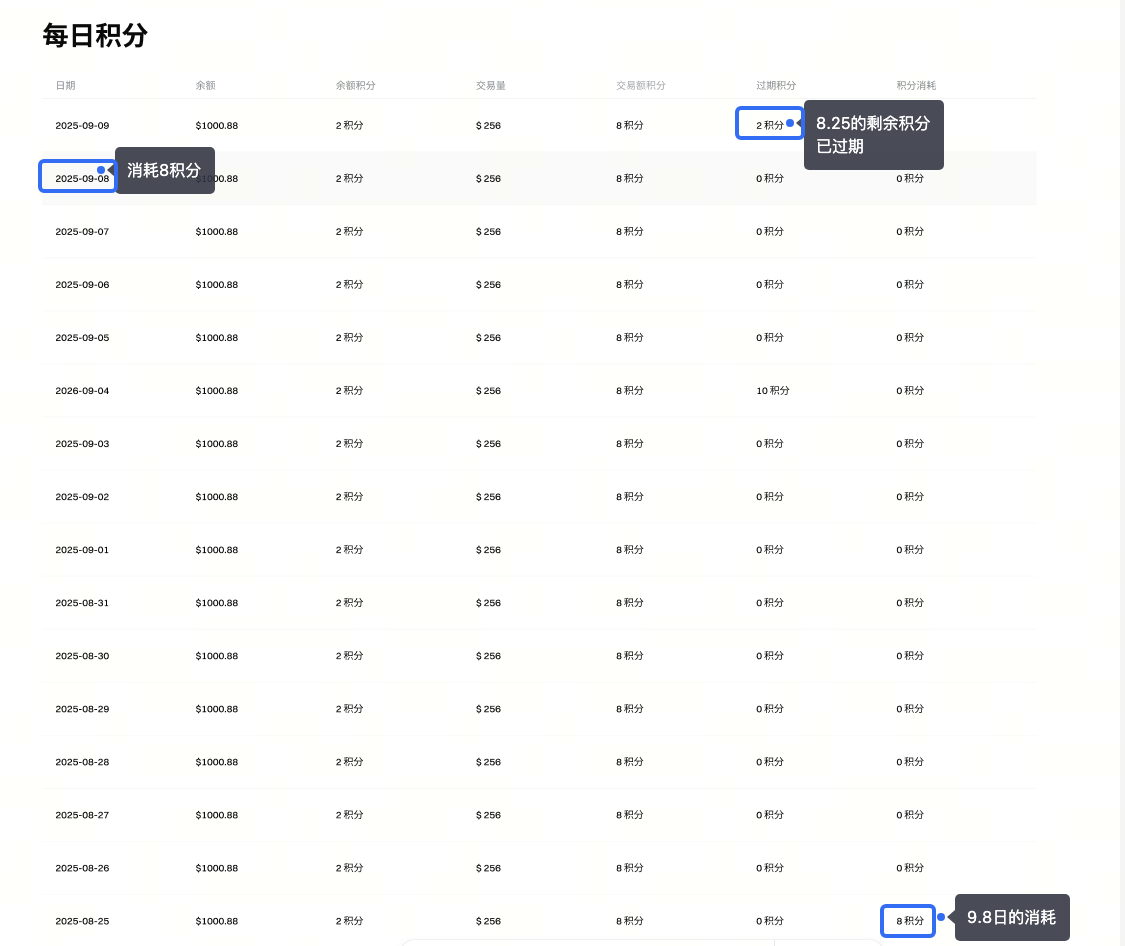
Assuming you consumed 8 points on September 8, these points would be deducted from the 10 points you received on August 25. The remaining unused points will appear under "Points Expired" on September 9. Note that we only display the points details for the most recent 15 days, so August 25 (16 days ago) is not shown in the table.
Example 2
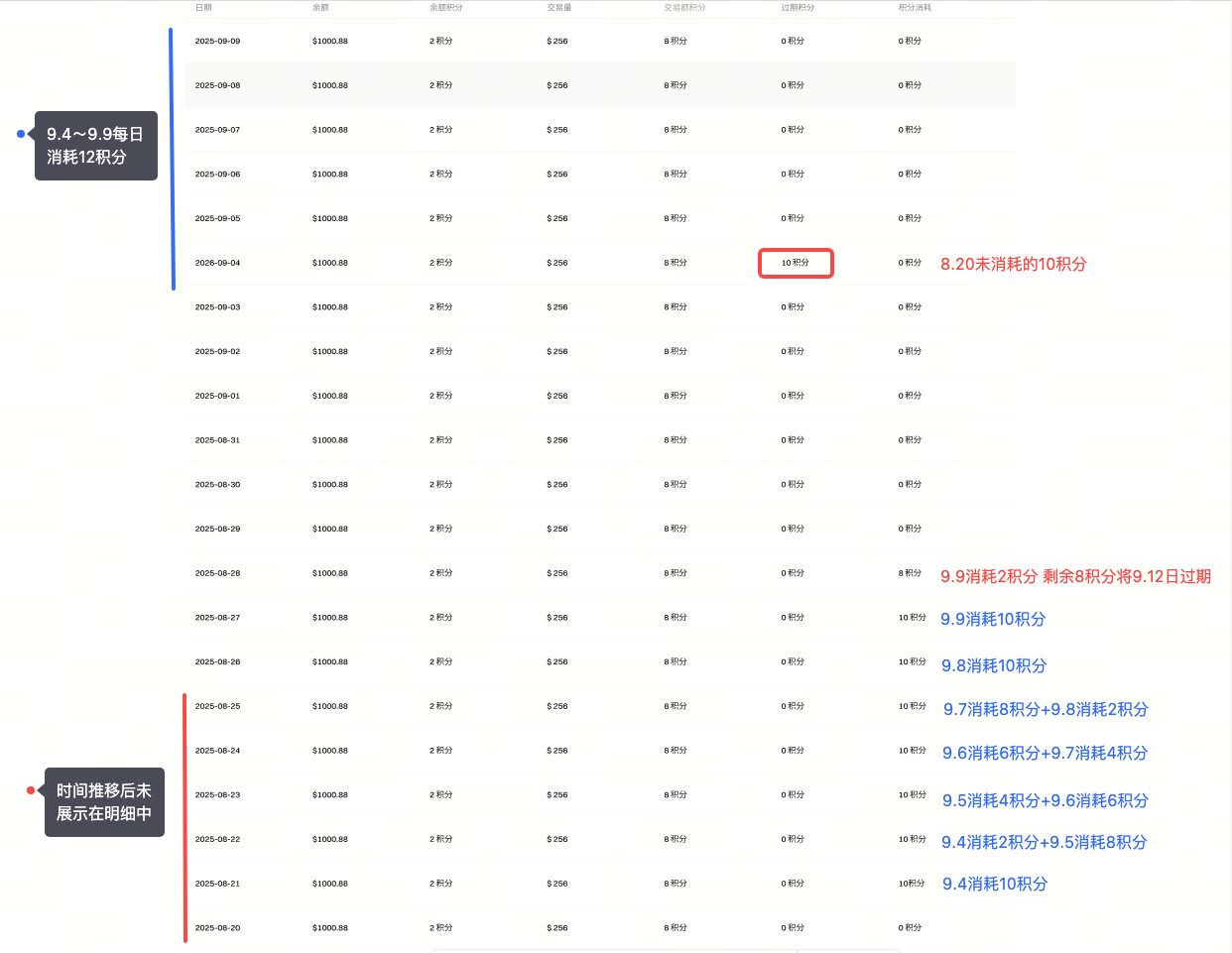
Assuming you consume 12 points daily from September 4 to September 9.
- The points consumed on September 4 will be deducted starting from points accrued on August 21, with 10 points taken from August 21 (15 days ago) and 2 points from August 22 (14 days ago). The deductions for September 5 will follow the same pattern, and so on.
- The "Points Expired" section shown on September 4 corresponds to the 10 unused points from August 20 (16 days ago).
- All points earned on August 21 have been consumed. The remaining 0 points will appear under "Points Expired" on September 5 (15 days after August 21).
- If the 8 points earned on August 28 remain unused, they will be reflected as 8 expired points on September 12 (15 days after August 28).
How to verify your points accurately?
It is simple: Points Balance = Total Points Earned in the Last 15 Days – All Points Used in the Last 15 Days.
Reminder:
Expired points on T–day are those earned 16 days ago (T–16) that haven't been used, rather than points from T–15.
The points consumed on T–day are deducted starting from points earned on T–15, not directly reflected as deducted from points earned on T–day.
Disclaimer
The content provided herein is for reference and educational purposes only and does not constitute any financial, investment, trading, or legal advice, nor does it constitute an offer or solicitation to buy or sell any digital assets. Gate makes no express or implied representations or warranties regarding the accuracy, completeness, or timeliness of the information contained herein. Product features, interfaces, rules, and fee structures may be updated or adjusted at any time. Please refer to the latest announcements and the actual information displayed on the Gate platform for the most accurate details.
Digital asset investments involve significant risk, and prices may fluctuate substantially. You may lose the entire amount of your investment. Please make decisions cautiously based on your own financial situation and risk tolerance after fully understanding the associated risks. If necessary, you are advised to consult an independent professional financial or legal advisor.
For more information about potential risks, please refer to Gate's Risk Disclosure and User Agreement.
