


Aplicabilidade
Este guia aplica-se a: Gate Web / App
Preparação antes da operação: Registo da conta e verificação de identidade (KYC) concluídos
Tempo estimado necessário: 5 minutos
Objetivo
Este artigo irá explicar-lhe como utilizar a funcionalidade de ordens segmentadas no Gate Web e na aplicação, otimizando a execução da negociação através da divisão de ordens de grande volume em várias ordens mais pequenas.
O que é uma ordem segmentada?
As ordens segmentadas permitem dividir uma ordem de grande volume em várias ordens mais pequenas, que são automaticamente efetuadas de acordo com intervalos de preço e distribuições de quantidade predefinidos. Pode definir o preço mínimo, o preço máximo, o intervalo de quantidade da ordem e o método de distribuição (proporcional, crescente ou decrescente) para implementar estratégias de negociação mais flexíveis.
Principais benefícios
- Menor derrapagem: Dividir ordens de grande volume em várias subordens mais pequenas ajuda a evitar oscilações repentinas de preço e a derrapagem causada por movimentos bruscos do mercado.
- Maior controlo da execução: Ajuste o volume e o momento da ordem com base nas condições do mercado, tirando partido da volatilidade a curto prazo, mantendo simultaneamente a estabilidade e o controlo.
- Mais pontos de entrada: Entre em posições em vários níveis de preço, abrangendo uma ampla gama de preços para otimizar os resultados das negociações e captar melhor as tendências do mercado.
Casos de utilização
- Reduzir o impacto no mercado: Em mercados com baixa liquidez, a execução de uma ordem de grande volume de uma só vez pode provocar flutuações significativas nos preços. Ao dividir uma ordem de grande volume em ordens mais pequenas e executá-las gradualmente, é possível minimizar eficazmente o impacto nos preços de mercado.
- Posicionamento em várias faixas de preço: Se prevê que o mercado oscile dentro de uma faixa de preço específica, definir ordens a diferentes preços em lotes aumenta a flexibilidade e a probabilidade de execução.
- Controlo do custo de entrada: A utilização de ordens segmentadas permite-lhe construir uma posição a vários níveis de preço, calculando a média do custo de manutenção da posição e evitando o risco de pagar a mais a um único preço.
- Melhorar a automatização das negociações: Para os negociadores que não podem acompanhar o mercado constantemente, a definição de regras para ordens segmentadas permite a colocação automática de ordens em lote, melhorando a eficiência da execução.
Exemplo de utilização
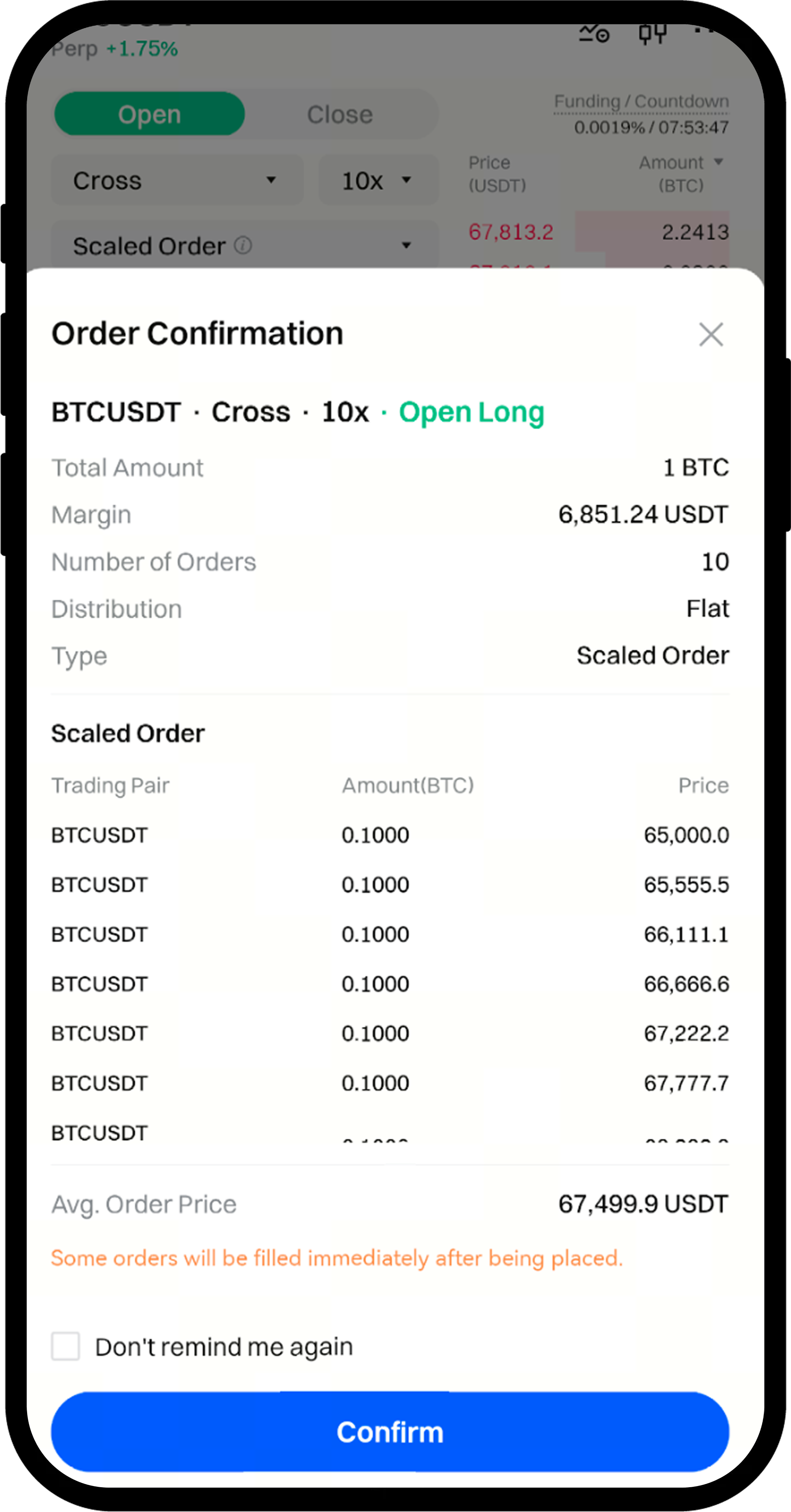
Suponhamos que o BTCUSDT esteja atualmente a ser negociado a 65 000 USDT. O utilizador A pretende comprar 1 BTC e opta por ordens segmentadas com os seguintes parâmetros:
- Valor total da ordem: 1 BTC
- Número de ordens: 10
- Modo de distribuição das ordens: Média
- Tamanho por sub-ordem: 0,1 BTC
- Faixa de preço: 65 000 – 75 000 USDT
- Intervalo de preço: 1111,1 USDT
- Preço médio de entrada: (65 000 + 66 111,1 +...75 000)/10 = 70 000 USDT
Após enviar a ordem, serão inseridas 10 ordens a preço fixo no livro de ordens. A primeira sub-ordem é de 0,1 BTC a 65 000 USDT, e as ordens subsequentes são colocadas a preços progressivamente mais elevados: 66 111,1 USDT, 67 222,2 USDT, 68 333.3 USDT, etc. Assim que o preço de mercado ultrapassar os 75 000 USDT, todas as ordens são executadas, com um preço médio de preenchimento de 70 000 USDT.
Nota: se o preço de mercado atual for mais favorável do que o preço da sub-ordem, as sub-ordens que forem executadas imediatamente serão assinaladas como "execução imediata" na pré-visualização da ordem segmentada.
Passos (Versão Web)
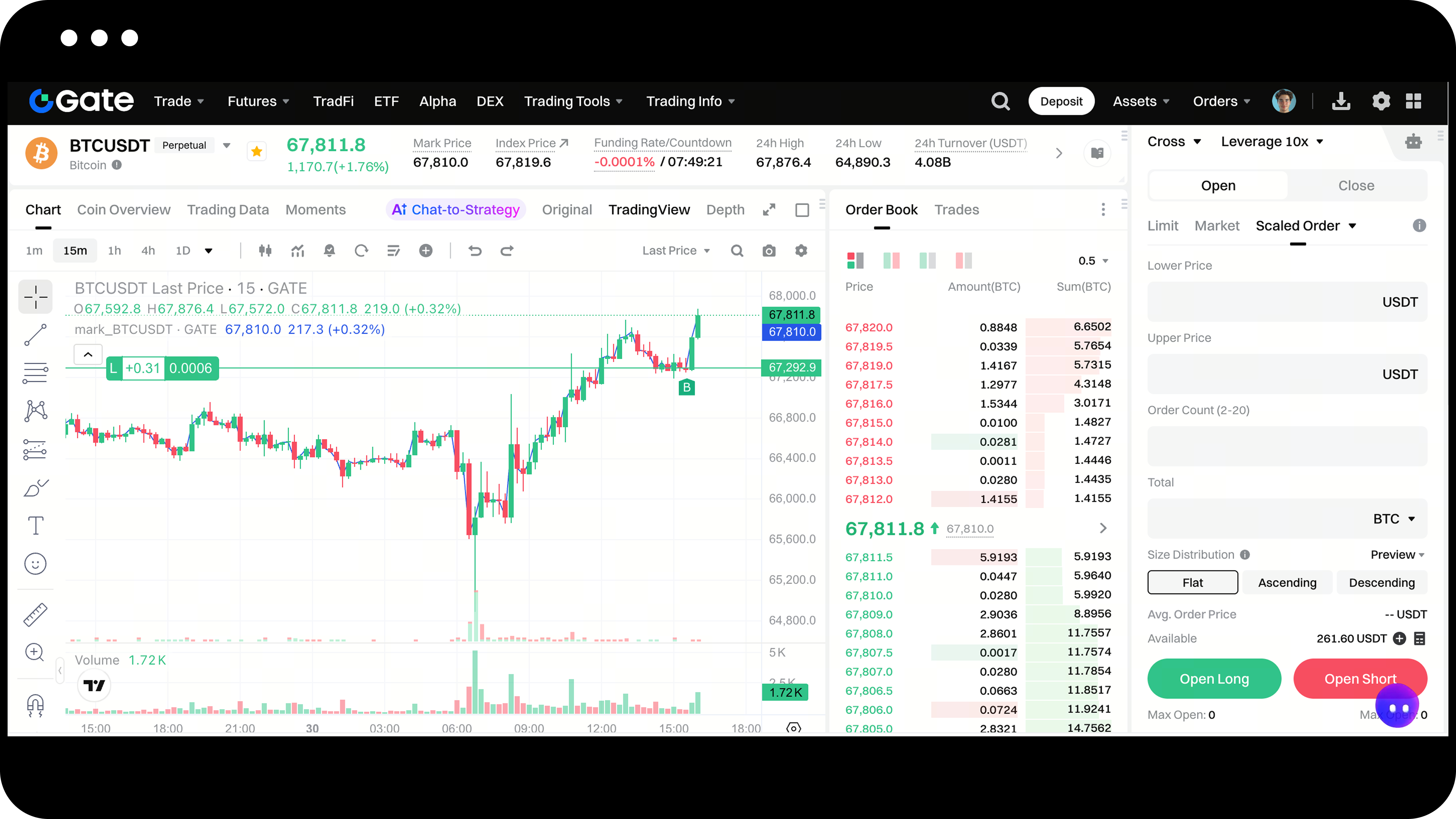
Passo 1: Aceder à ordem segmentada
Na página de negociação, selecione o par de negociação para o qual pretende colocar uma ordem e, em seguida, clique em Ordem Segmentada na área de ordens à direita.
Passo 2: Definir os parâmetros da ordem
Crie a sua ordem segmentada utilizando os seguintes parâmetros:
| Nome do parâmetro | Descrição |
|---|---|
| Modo de posição | De acordo com a preferência de modo de posição do contrato selecionado. |
| Preço mínimo | Limite inferior do intervalo de preços para subordens segmentadas. |
| Preço máximo | Limite superior do intervalo de preços para subordens segmentadas. |
| Número de ordens | Número total de subordens divididas ao executar uma ordem segmentada; o intervalo é de 2 a 10. |
| Quantidade total | Introduza a quantidade total a enviar para a ordem. |
| Distribuição de quantidades | Método de distribuição para repartir as quantidades: média, crescente ou decrescente. O padrão é a média. |
| Média: Distribuir a quantidade total uniformemente pelas ordens, colocando-as em intervalos de preço médios. | |
| Crescente: Distribuir a quantidade de forma incremental pelas ordens, colocando-as a intervalos de preço médios. | |
| Decrescente: Distribuir a quantidade de forma decrescente pelas ordens, colocando-as em intervalos de preço médio. | |
| Reduce Only | Aplica-se apenas ao modo de negociação unidirecional para a negociação de contratos perpétuos. No modo de posição dupla, para ordens de encerramento, os negociadores podem alternar para o separador "Fechar" para criar ordens segmentadas. |
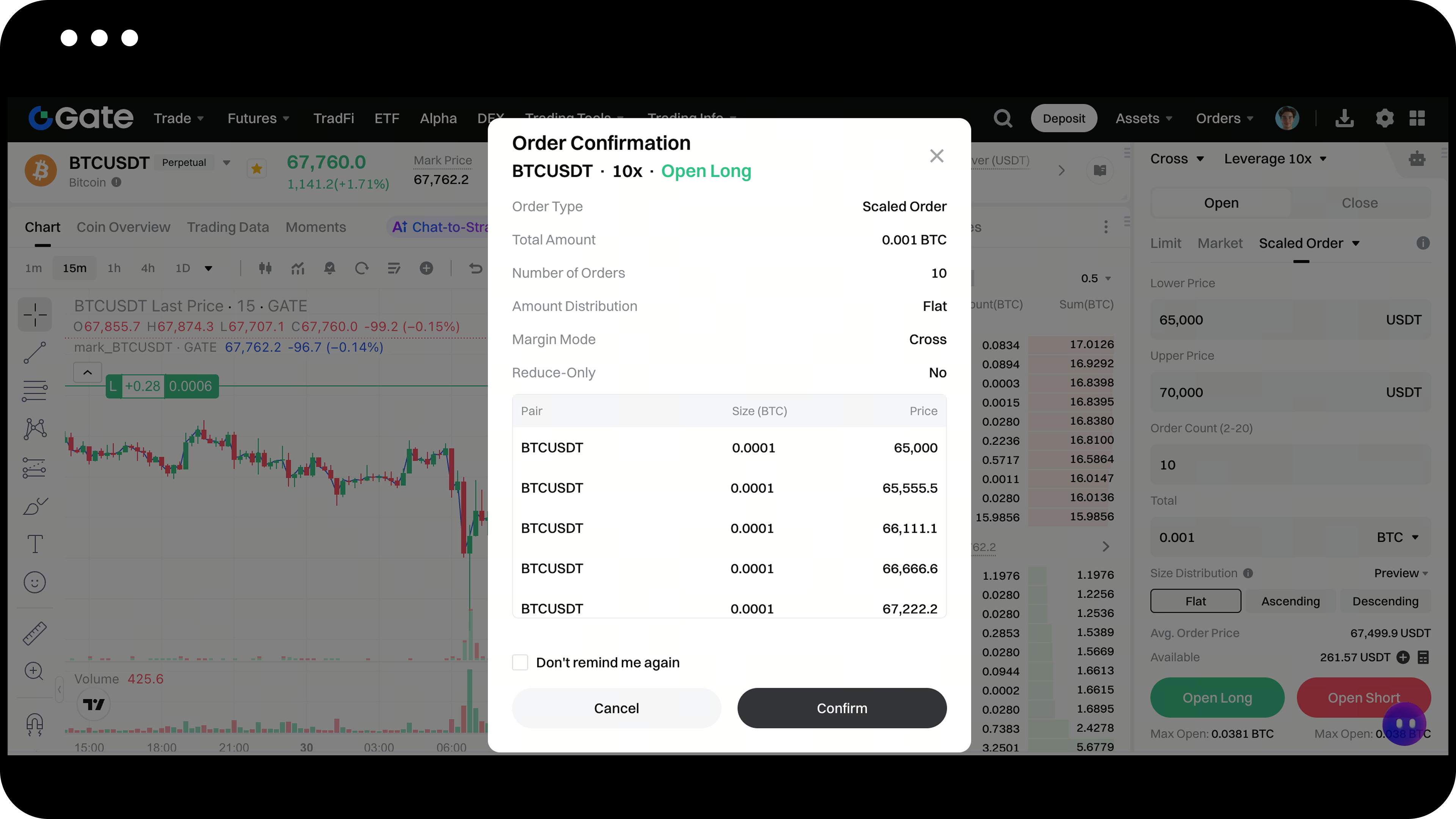
Passo 3: Confirmar e enviar a ordem
Verifique novamente todos os detalhes da sua ordem e, em seguida, clique em Confirmar para enviar a ordem.
Passo 4: Ver e gerir ordens
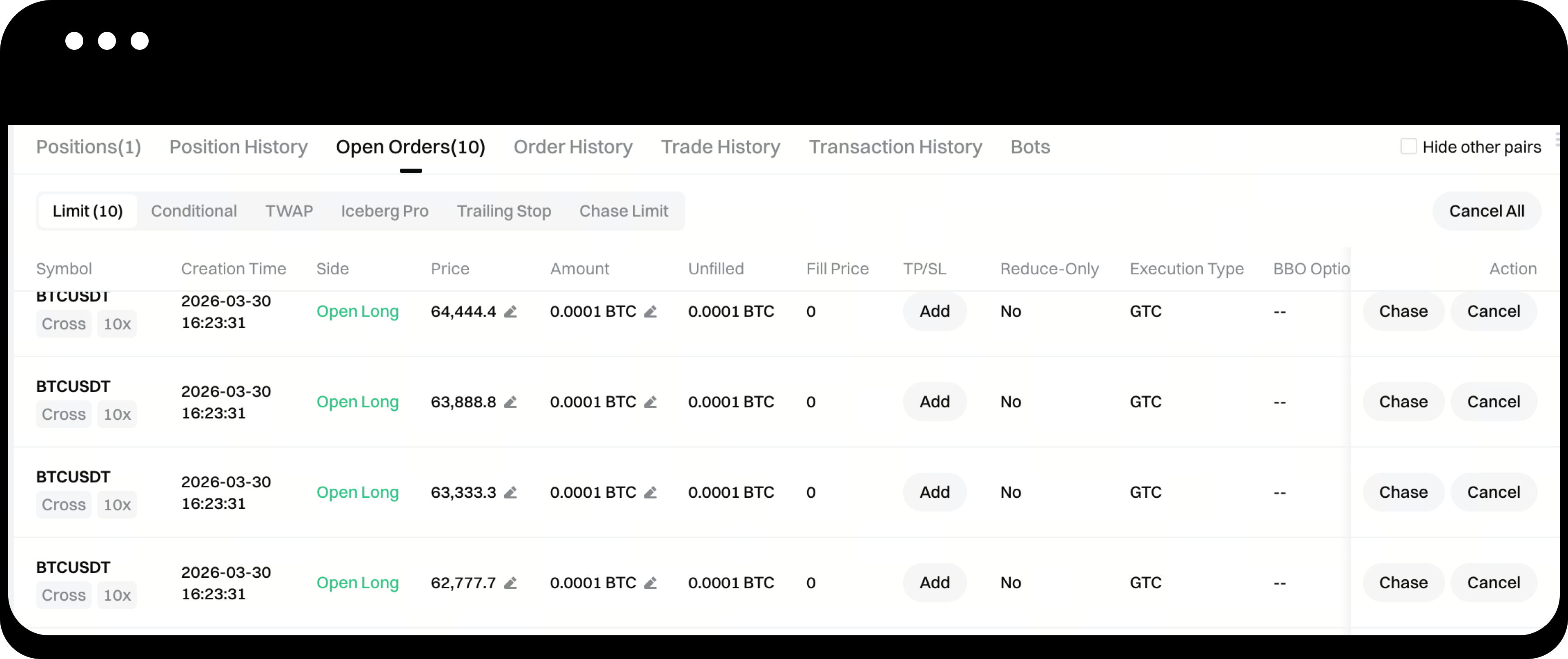
Depois de efetuar a sua ordem, pode ver as suas ordens ativas em Ordens atuais > Ordens limite, na parte inferior da página de negociação.
As subordens segmentadas permitem a alteração e o cancelamento das ordens. Pode gerir essas ordens nos detalhes da ordem, na secção Ordens atuais - "Ordens limite".
Passo 5: Verificar o histórico de ordens
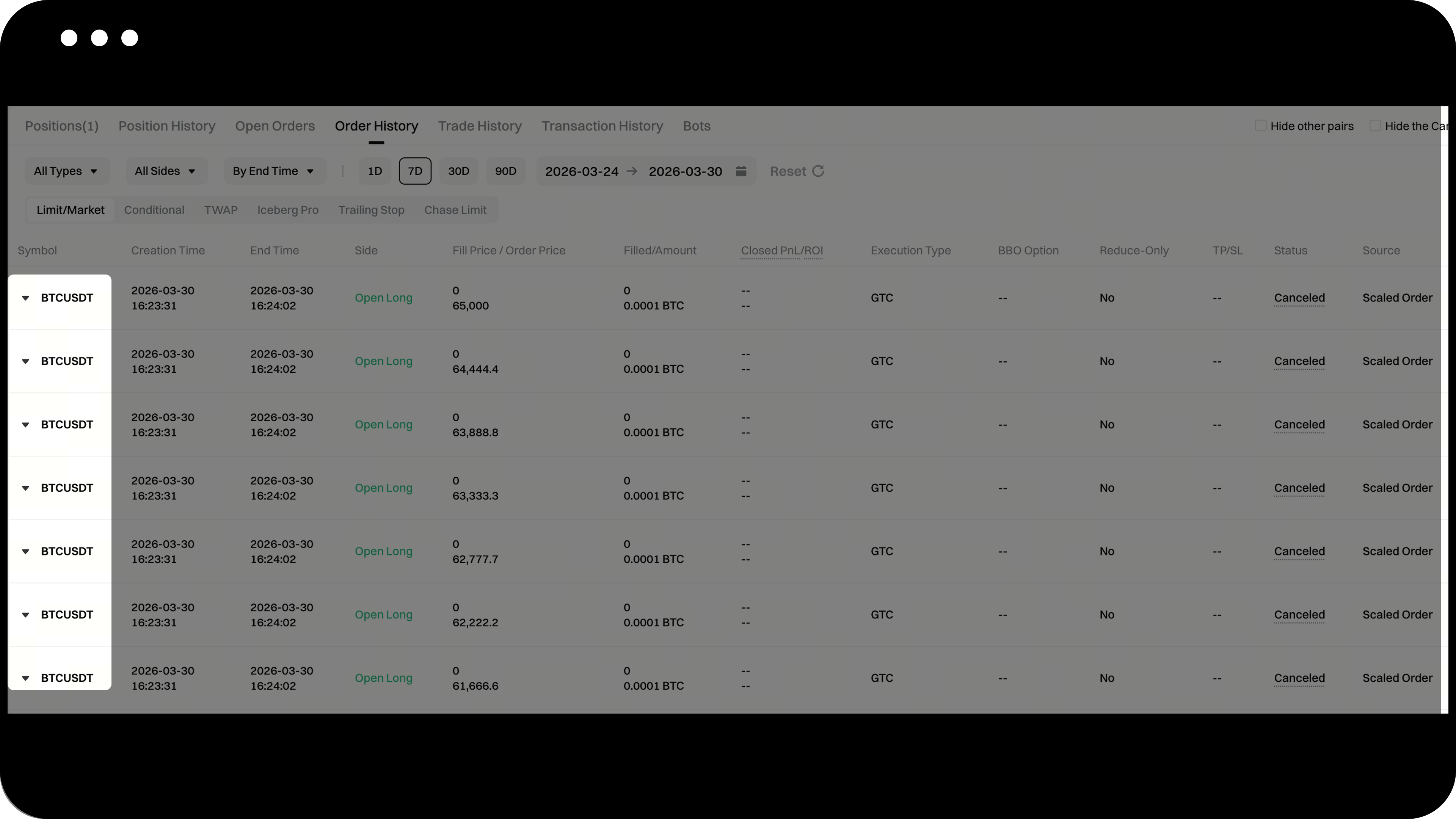
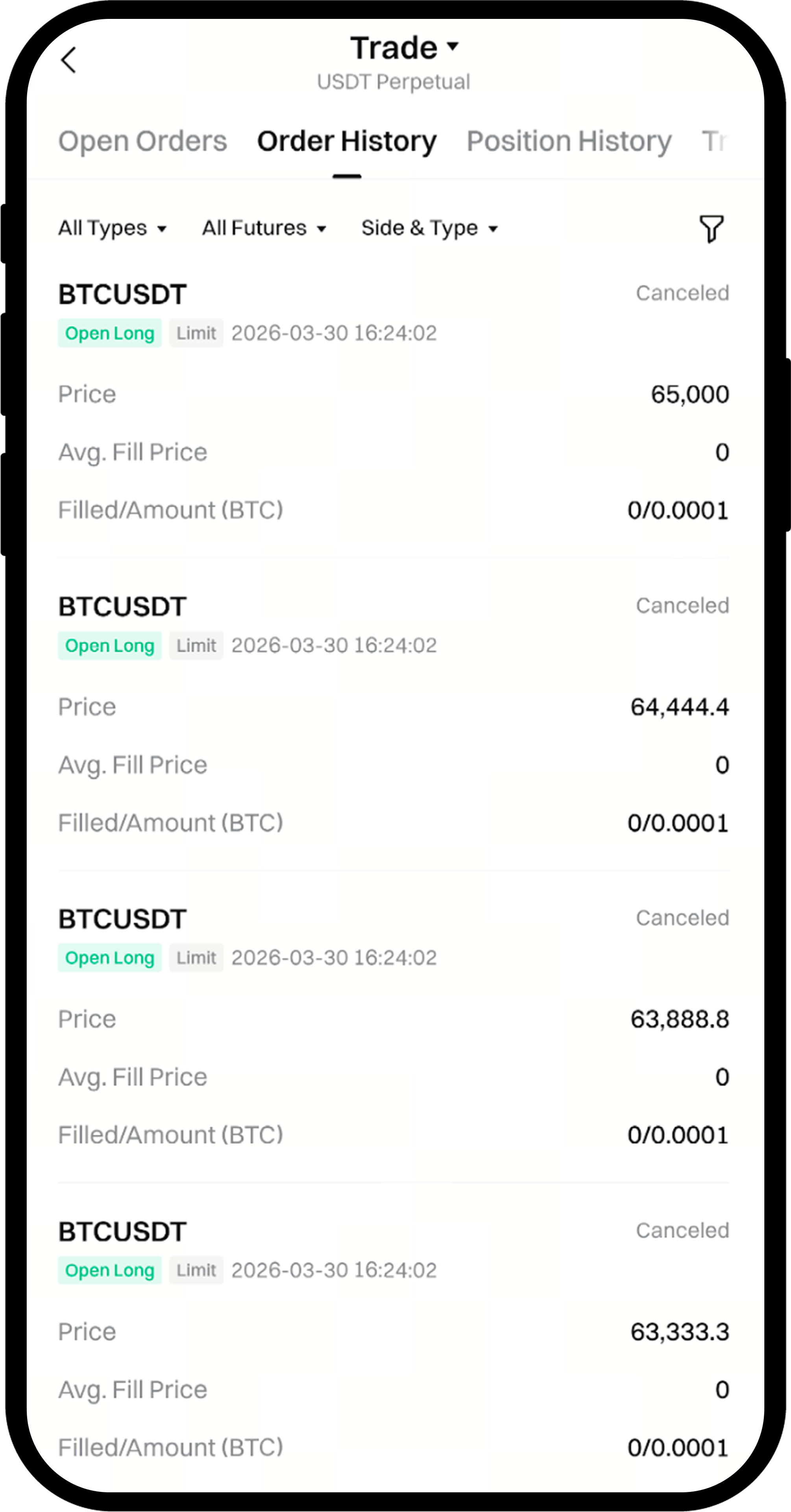
As subordens segmentadas concluídas ou canceladas aparecerão no Histórico de ordens.
Pode consultar os detalhes das ordens segmentadas na lista Histórico de ordens - Ordens com limite | Ordens de mercado.
Passos (Versão da aplicação)
Passo 1: Aceder à ordem segmentada
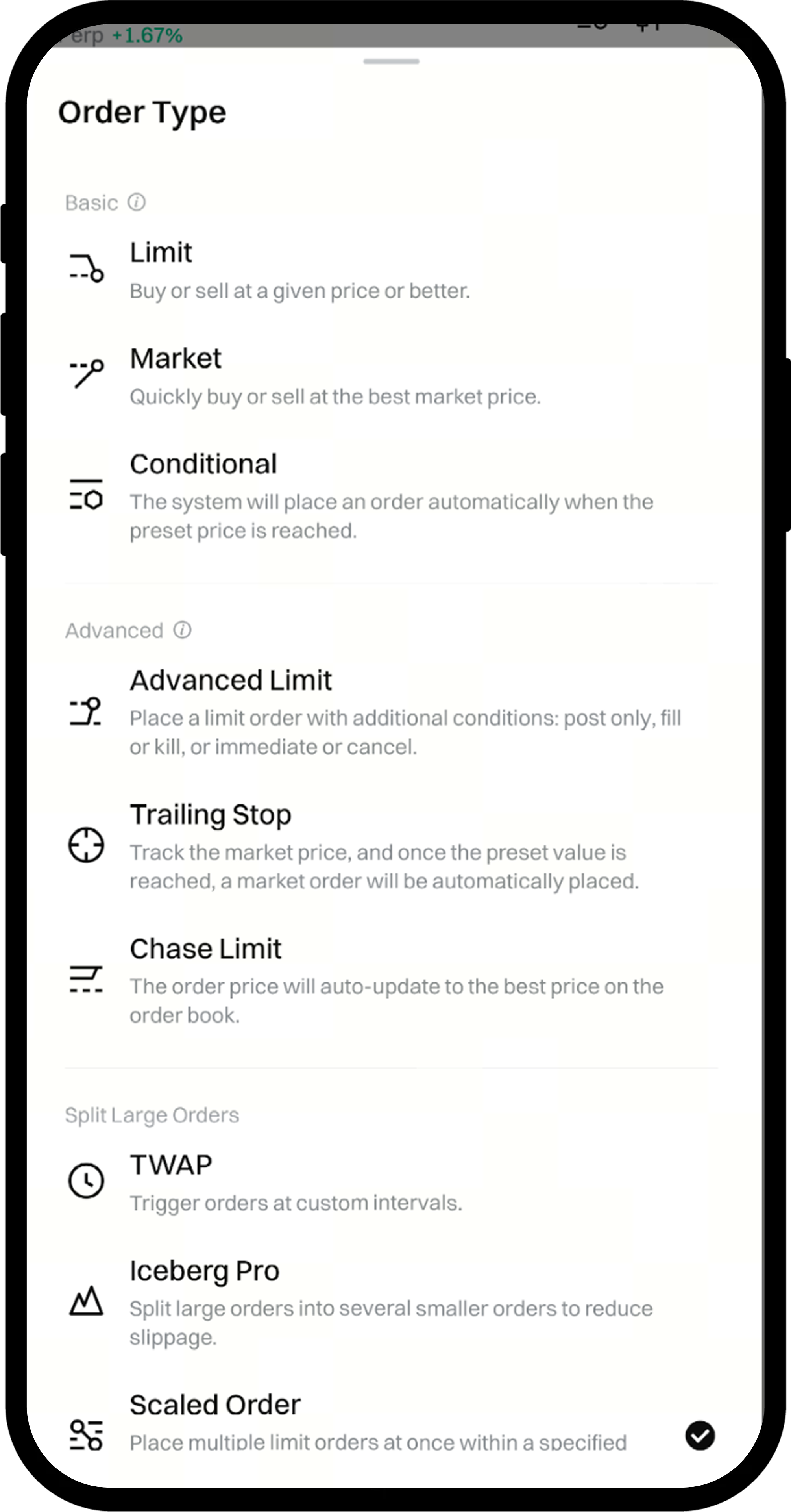
Na página de negociação, selecione o par de negociação para o qual pretende colocar uma ordem; em seguida, expanda as opções de tipos de ordem na área de ordens e selecione Ordem Segmentada.
Passo 2: Definir os parâmetros da ordem
Crie a sua ordem segmentada utilizando os seguintes parâmetros:
| Nome do parâmetro | Descrição |
|---|---|
| Modo de posição | De acordo com a preferência de modo de posição do contrato selecionado. |
| Preço mínimo | Limite inferior do intervalo de preços para subordens segmentadas. |
| Preço máximo | Limite superior do intervalo de preços para subordens segmentadas. |
| Número de ordens | Número total de subordens divididas ao executar uma ordem segmentada; o intervalo é de 2 a 10. |
| Quantidade total | Introduza a quantidade total a enviar para a ordem. |
| Distribuição de quantidades | Método de distribuição para repartir as quantidades: média, crescente ou decrescente. O padrão é a média. |
| Média: Distribuir a quantidade total uniformemente pelas ordens, colocando-as em intervalos de preço médios. | |
| Crescente: Distribuir a quantidade de forma incremental pelas ordens, colocando-as a intervalos de preço médios. | |
| Decrescente: Distribuir a quantidade de forma decrescente pelas ordens, colocando-as em intervalos de preço médio. | |
| Reduce Only | Aplica-se apenas ao modo de negociação unidirecional para a negociação de contratos perpétuos. No modo de posição dupla, para ordens de encerramento, os negociadores podem alternar para o separador "Fechar" para criar ordens segmentadas. |
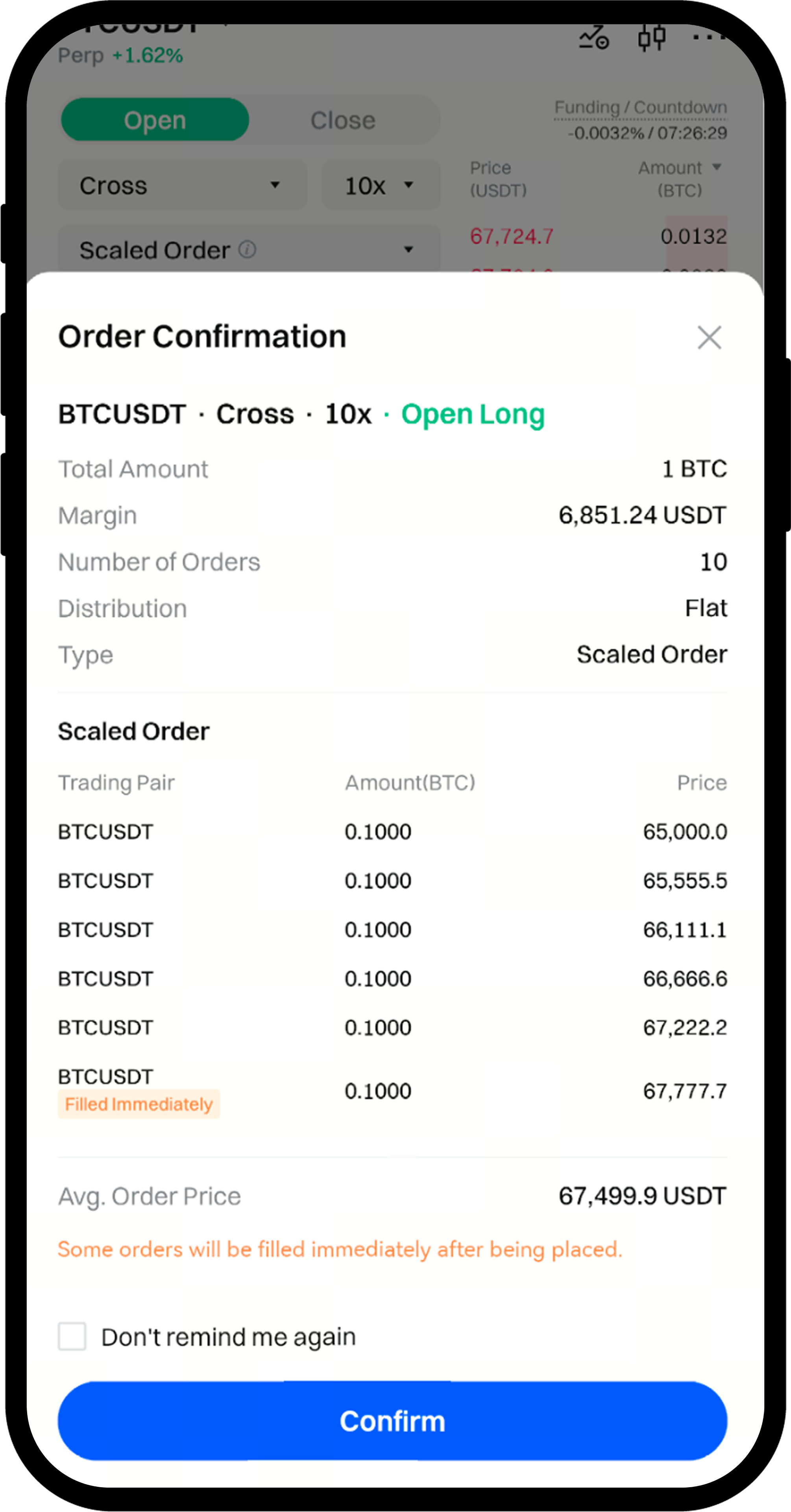
Passo 3: Confirmar e enviar a ordem
Verifique novamente todos os detalhes da sua ordeme, em seguida, toque em Confirmar para enviar a ordem.
Passo 4: Ver e gerir ordens
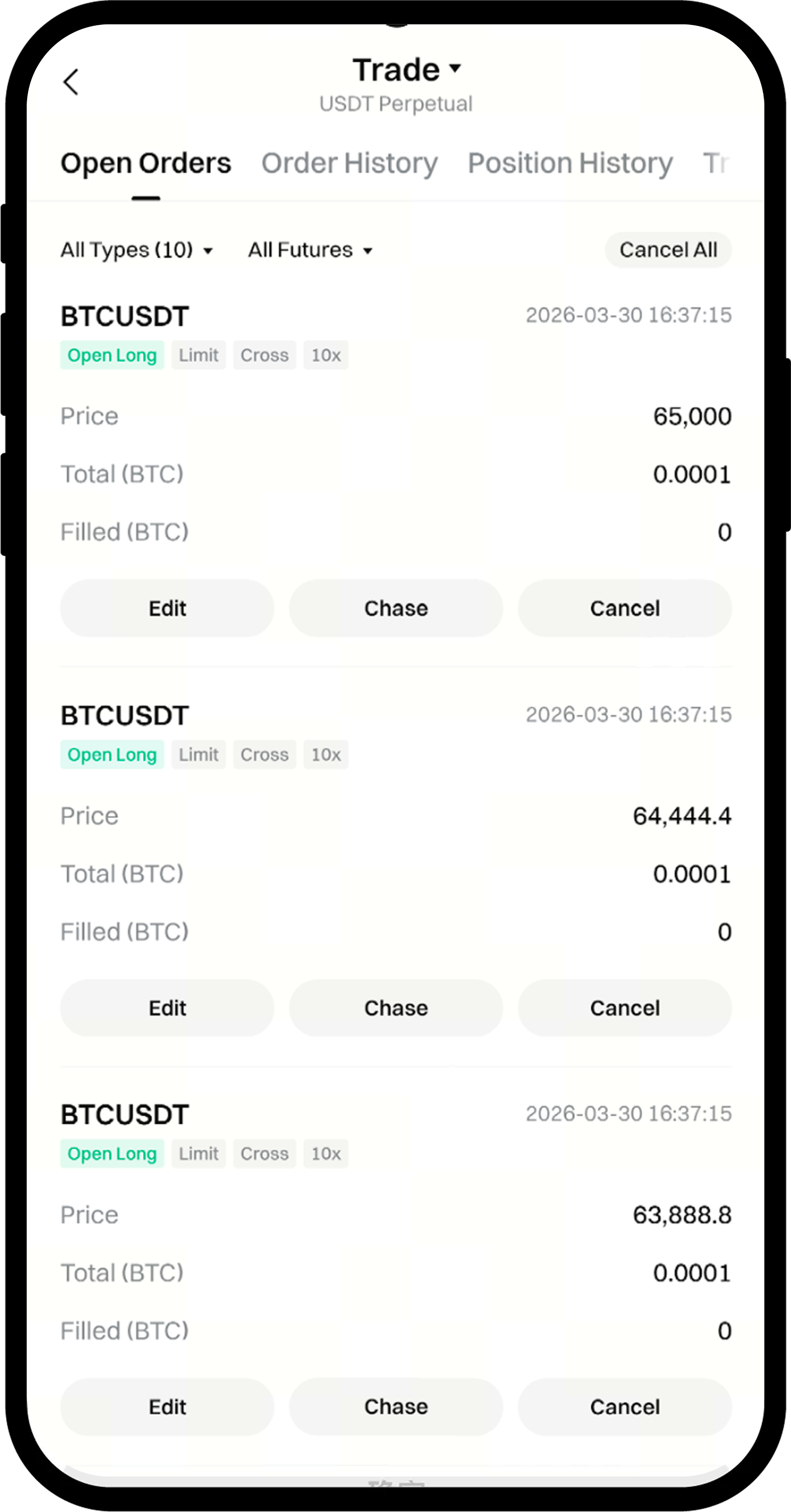
Depois de efetuar a sua ordem, pode visualizar as ordens segmentadas em Ordens atuais > Ordens limite, na parte inferior da página de negociação.
Para alterar ou cancelar, toque no botão Alterar ou Cancelar ao lado da ordem em Ordens atuais».
Passo 5: Verificar o histórico de ordens
As subordens segmentadas concluídas ou canceladas aparecerão no Histórico de ordens.
Toque no ícone Fatura, na extremidade direita da secção Ordensatuais, na parte inferior da página de negociação, para ver o seu histórico de encomendas.
Observações
- O intervalo de quantidade de ordens segmentadas é de 2 a 10 subencomendas
- Se o preço de mercado atual for mais favorável do que o preço da sub-ordem, essa sub-ordem será executada imediatamente
- A utilização de ordens segmentadas em mercados ilíquidos pode fazer com que algumas subordens não sejam executadas
- Cada ordem pode ser alterada ou cancelada individualmente
Perguntas frequentes
P1: Qual é a diferença entre ordens segmentadas e ordens limitadas normais?
R: As ordens segmentadas dividem automaticamente uma ordem de grande volume em várias ordens mais pequenas, colocadas a diferentes níveis de preço, enquanto uma ordem com limite normal é colocada a um único nível de preço. As ordens segmentadas ajudam a reduzir a derrapageme o impacto no mercado.
P2: É possível cancelar parcialmente subordens segmentadas?
A: Sim. Cada subordem é uma ordem com limite independente. Pode cancelar ou alterar qualquer subordem individualmente em Ordens atuais.
P3: Como são executadas as ordens segmentadas se o preço de mercado oscilar rapidamente?
R: Se o preço de mercado se desviar rapidamente do intervalo de preços definido, algumas subordens poderão ser executadas imediatamente, enquanto outras poderão não ser executadas. Pode verificar o estado de cada subordema em Ordens atuais.
O conteúdo aqui disponibilizado destina-se apenas a fins de referência e educativos, não constituindo qualquer aconselhamento financeiro, de investimento, de negociação ou jurídico, nem representa uma oferta ou solicitação para comprar ou vender quaisquer ativos digitais. A Gate não assume quaisquer declarações ou garantias, expressas ou implícitas, quanto à exatidão, integridade ou atualidade das informações aqui contidas. As funcionalidades dos produtos, interfaces, regras e estruturas de comissões podem ser atualizadas ou ajustadas a qualquer momento. Consulte os anúncios mais recentes e a informação efetivamente apresentada na plataforma Gate para obter os dados mais precisos.
Os investimentos em ativos digitais envolvem riscos significativos, podendo os preços variar substancialmente. Existe a possibilidade de perder a totalidade do montante investido. Tome decisões de forma cautelosa, tendo em conta a sua situação financeira e tolerância ao risco, após compreender plenamente os riscos associados. Se necessário, recomenda-se consultar um consultor financeiro ou jurídico independente.
Para mais informações sobre potenciais riscos, consulte a Divulgação de Riscos e o Acordo de Utilizador da Gate.
