


Ruang Lingkup yang Berlaku
Panduan ini berlaku untuk Gate Web
Sebelum memulai: Pastikan Anda sudah memiliki akun Gate dan sudah login
Perkiraan waktu: 2 menit
Tujuan
Panduan ini akan memandu Anda tentang cara mengganti waktu mulai-akhir pada persentase perubahan harga di Gate Web.
Langkah-langkah
Langkah 1: Masuk ke Halaman Trading
Login ke akun Gate Anda dan klik "Trade" di bilah navigasi atas. Pilih "Spot" dari menu dropdown untuk masuk ke halaman trading spot.
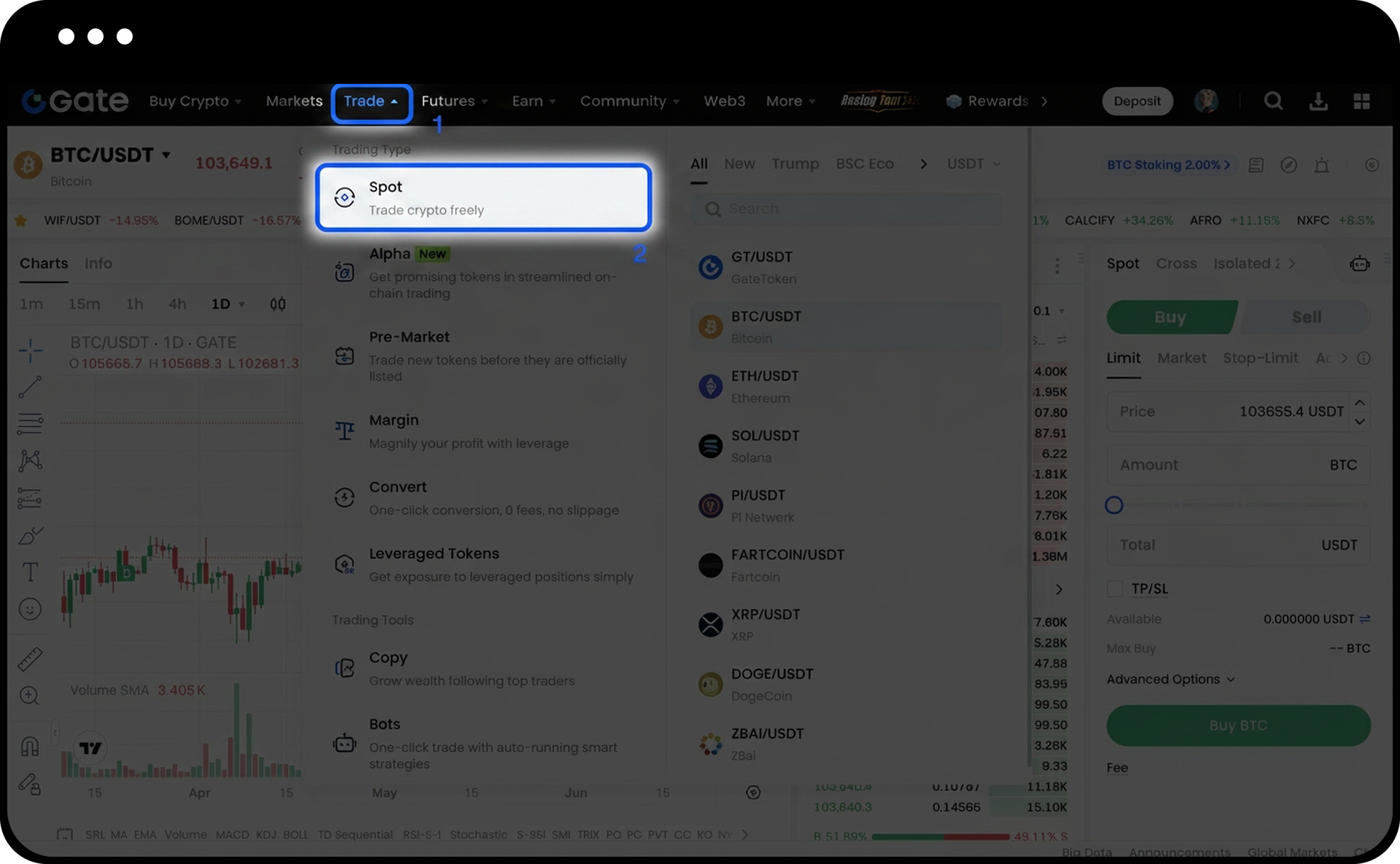
Langkah 2: Buka Pengaturan
Di halaman trading, temukan dan klik ikon "Settings" di pojok kanan atas antarmuka.
Langkah 3: Pilih Opsi Waktu Mulai-Akhir
Di menu pengaturan, cari "Start-End Time of the Change" dan pilih opsi yang Anda inginkan dari tiga pilihan berikut:
- Last 24 hours: Membandingkan harga saat ini dengan harga 24 jam yang lalu
- UTC+8 00:00: Membandingkan harga saat ini dengan harga pada tengah malam waktu Beijing (00:00)
- UTC 00:00: Membandingkan harga saat ini dengan harga pada tengah malam UTC (08:00 waktu Beijing)
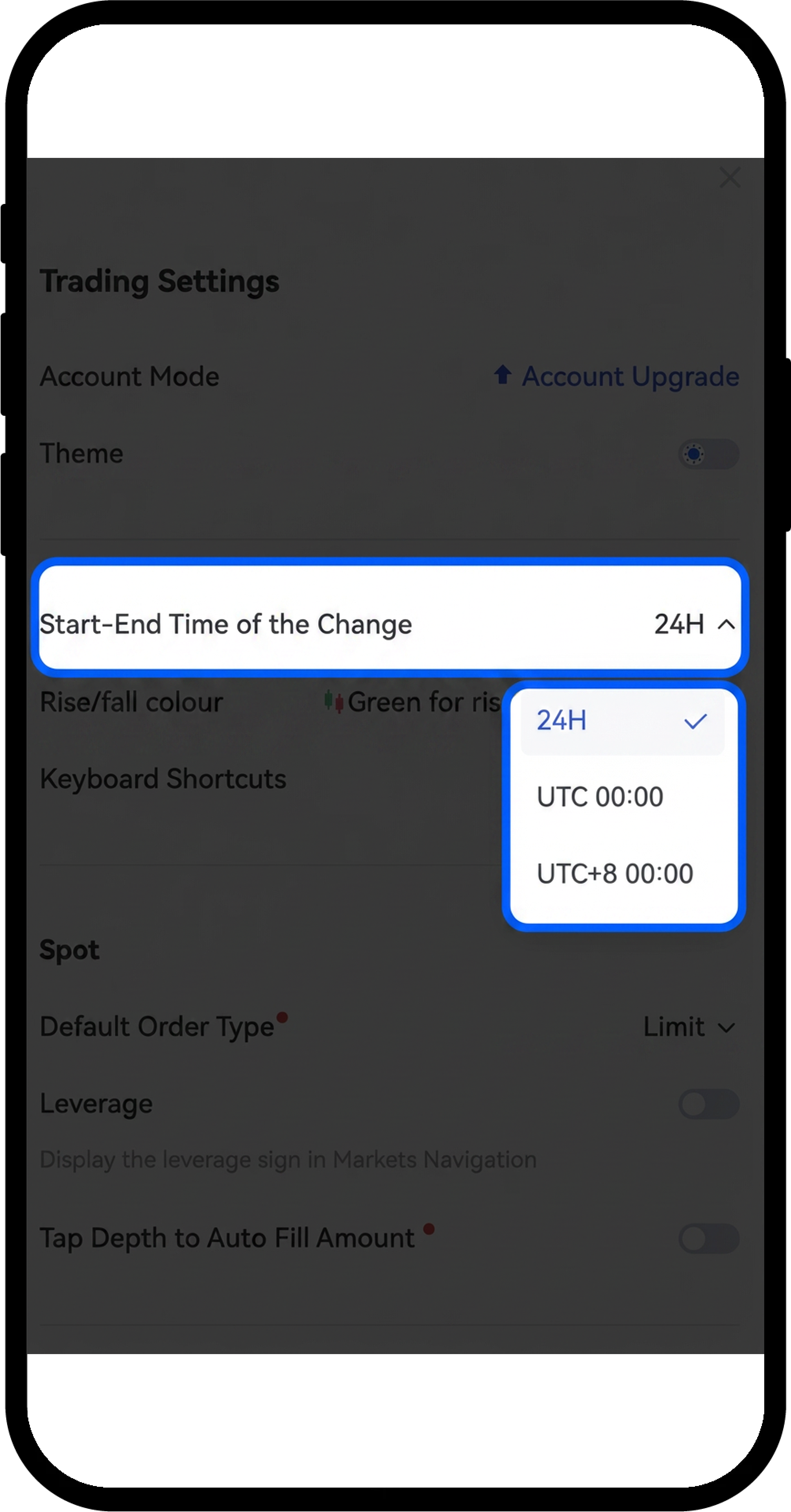
Pilihan Anda akan langsung diterapkan pada semua tampilan perubahan harga di platform.
Catatan
- Gate Web menggunakan waktu UTC sebagai acuan waktu standar.
- UTC 00:00 setara dengan pukul 08:00 waktu Beijing.
- UTC+8 00:00 setara dengan pukul 00:00 waktu Beijing.
- Pastikan Anda memilih opsi zona waktu yang sesuai dengan preferensi Anda.
- Gate dapat memperbarui fitur produk dan antarmuka kapan saja.
- Informasi ini hanya untuk tujuan edukasi dan bukan merupakan saran keuangan.
FAQ
Q1: Apa perbedaan antara tiga opsi waktu mulai tersebut?
A: "Last 24 hours" memberikan perbandingan bergulir selama 24 jam yang terus diperbarui. "UTC+8 00:00" akan di-reset setiap tengah malam waktu Beijing, sedangkan "UTC 00:00" di-reset setiap tengah malam UTC (yang berarti pukul 8 pagi waktu Beijing). Pilihlah berdasarkan titik referensi mana yang paling berguna untuk analisis trading Anda.
Q2: Apakah perubahan pengaturan ini akan memengaruhi riwayat trading atau order yang sudah ada?
A: Tidak, pengaturan ini hanya memengaruhi tampilan persentase perubahan harga di antarmuka. Tidak akan berdampak pada riwayat trading, order yang sudah ada, atau fungsi akun lainnya.
Q3: Apakah saya bisa mengganti opsi waktu mulai kapan saja?
A: Ya, Anda dapat mengganti opsi waktu mulai sesuai kebutuhan dengan mengikuti langkah yang sama. Pengaturan baru akan langsung berlaku.
Penafian
Konten yang disediakan di sini hanya untuk tujuan referensi dan edukasi, dan tidak dimaksudkan sebagai saran keuangan, investasi, perdagangan, atau hukum, maupun sebagai penawaran atau ajakan untuk membeli atau menjual aset digital apa pun. Gate tidak memberikan jaminan atau pernyataan, baik secara tersurat maupun tersirat, mengenai keakuratan, kelengkapan, atau ketepatan waktu informasi yang terkandung di sini. Fitur produk, antarmuka, aturan, dan struktur biaya dapat diperbarui atau disesuaikan kapan saja. Silakan merujuk pada pengumuman terbaru dan informasi aktual yang ditampilkan di platform Gate untuk detail yang paling akurat.
Investasi aset digital melibatkan risiko yang signifikan, dan harga dapat berfluktuasi secara substansial. Anda dapat kehilangan seluruh jumlah investasi Anda. Harap mengambil keputusan dengan hati-hati berdasarkan situasi keuangan dan toleransi risiko Anda sendiri setelah sepenuhnya memahami risiko yang terkait. Jika diperlukan, disarankan untuk berkonsultasi dengan penasihat keuangan atau hukum independen.
Untuk informasi lebih lanjut tentang risiko potensial, silakan merujuk pada Pengungkapan Risiko dan Perjanjian Pengguna Gate.
