


Aplicabilidade
Aplicável a: Gate Web
Preparação: Iniciou sessão na Gate com permissões para criar produtos de gestão de ativos
Tempo estimado: 5 minutos
Objetivo
Este guia irá orientá-lo sobre como definir os parâmetros das taxas de desempenho para produtos de gestão de ativos na Gate Web, bem como compreender as regras de cálculo e os registos.
Guia de operação da taxa de desempenho do produto
A taxa de desempenho é um mecanismo de incentivo comum nos produtos de gestão de ativos. Quando um produto gera retornos, o gestor tem o direito de cobrar uma taxa com base numa percentagem dos retornos em excesso. Esta é uma característica habitual nos produtos de gestão de ativos e contribui para alinhar os incentivos, incentivando o gestor a alcançar um melhor desempenho dos investimentos.
Mecanismo central
A taxa de desempenho é calculada utilizando um método de retorno excedente anualizado com acumulação por escalões:
- A taxa só é cobrada quando o retorno do investimento excede o APY de referência.
- A taxa aplica-se apenas à parte que exceda o APY de referência.
- Os retornos de cada unidade são calculados utilizando o método FIFO (First-In, First-Out) com base no período de detenção.
Dois parâmetros fundamentais
- APY de referência (0%–50%): O limiar acima do qual é cobrada a taxa de desempenho. Por exemplo, se for definido em 8%, não é cobrada qualquer comissão de desempenho quando o retorno anualizado for ≤ 8%. Apenas a parte excedente está sujeita à taxa.
- Taxa de comissão de desempenho (0%–70%): A percentagem aplicada ao retorno excedente. Por exemplo, se for definido em 30 %, 30 % do retorno excedente será cobrado a título de comissão de desempenho.
Instruções de configuração
Etapa 1: Definir a taxa de desempenho
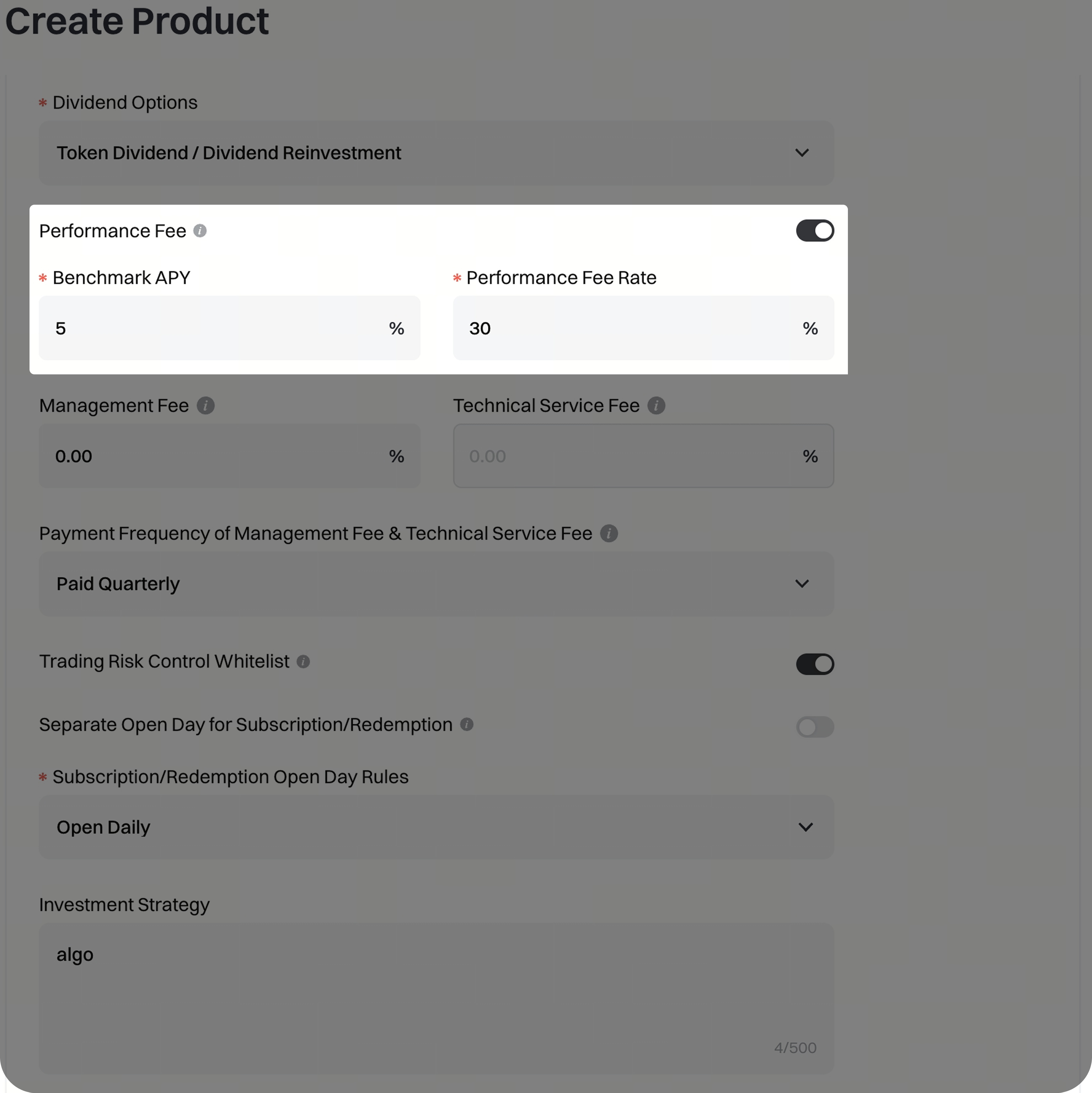
Selecione [Criar produto] na página de gestão de ativos e localize a secção [Taxa de desempenho].
- Ativar taxa de desempenho: Ativada por predefinição; pode ser desativada se não for necessária
- APY de referência: Introduza um valor entre 0 e 50 (até duas casas decimais)
- Lembrete: Introduza um número entre 0 e 50
- Exemplo: Introduza 8,00, o que corresponde a um APY de referência de 8%.
- Taxa de remuneração de desempenho: Introduza um valor entre 0 e 70 (até duas casas decimais, não pode ser 0)
- Lembrete: Introduza um número entre 0 e 70 (excluindo o 0)
- Exemplo: Introduza 30,00, o que corresponde a uma taxa de remuneração de desempenho de 30 %.
Etapa 2: Confirmar a taxa de desempenho
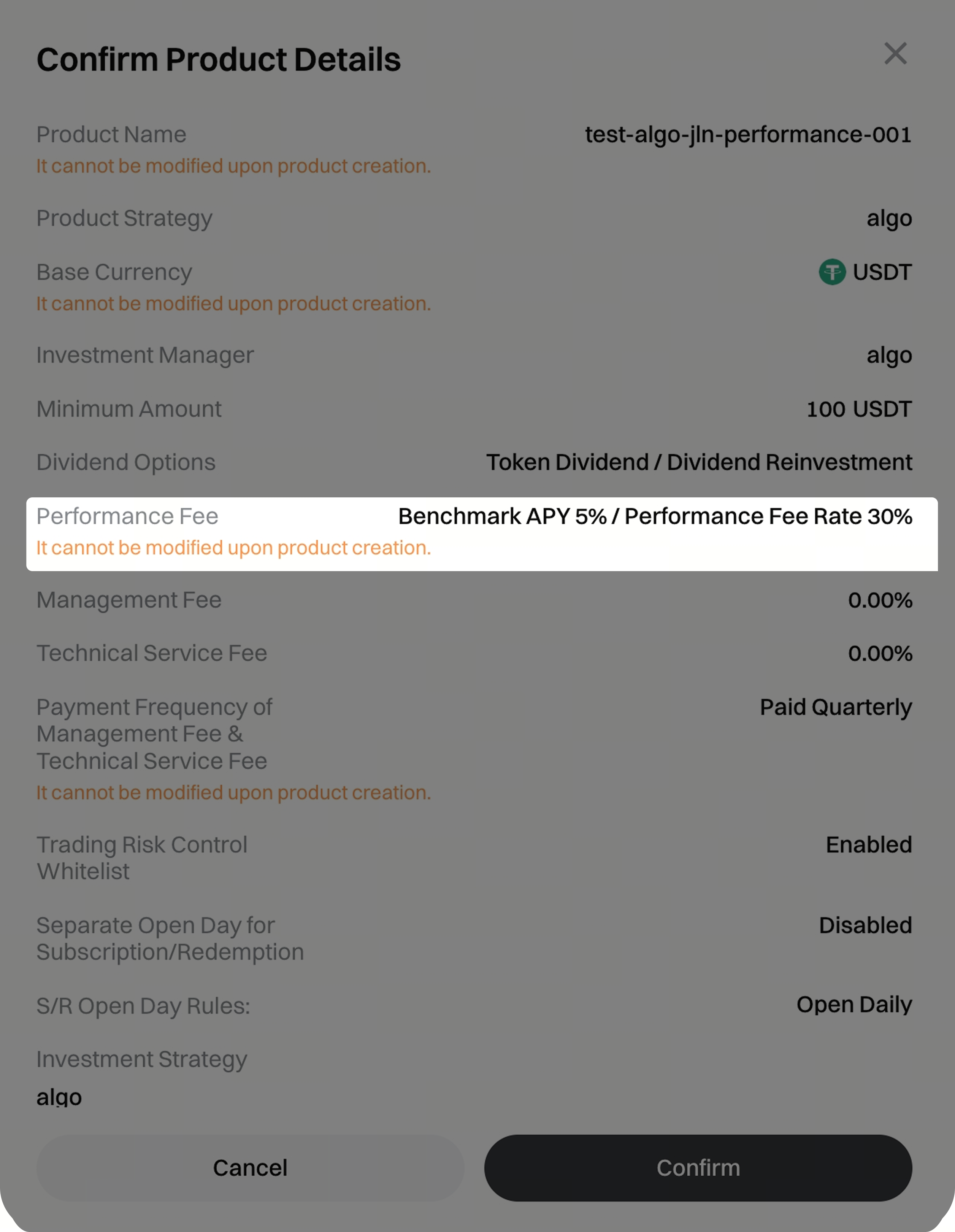
Ao clicar em [Criar produto], será exibida uma janela pop-up de confirmação com os detalhes da taxa de desempenho. Por favor, verifique as informações antes de enviar.
Etapa 3: Ver a taxa de desempenho
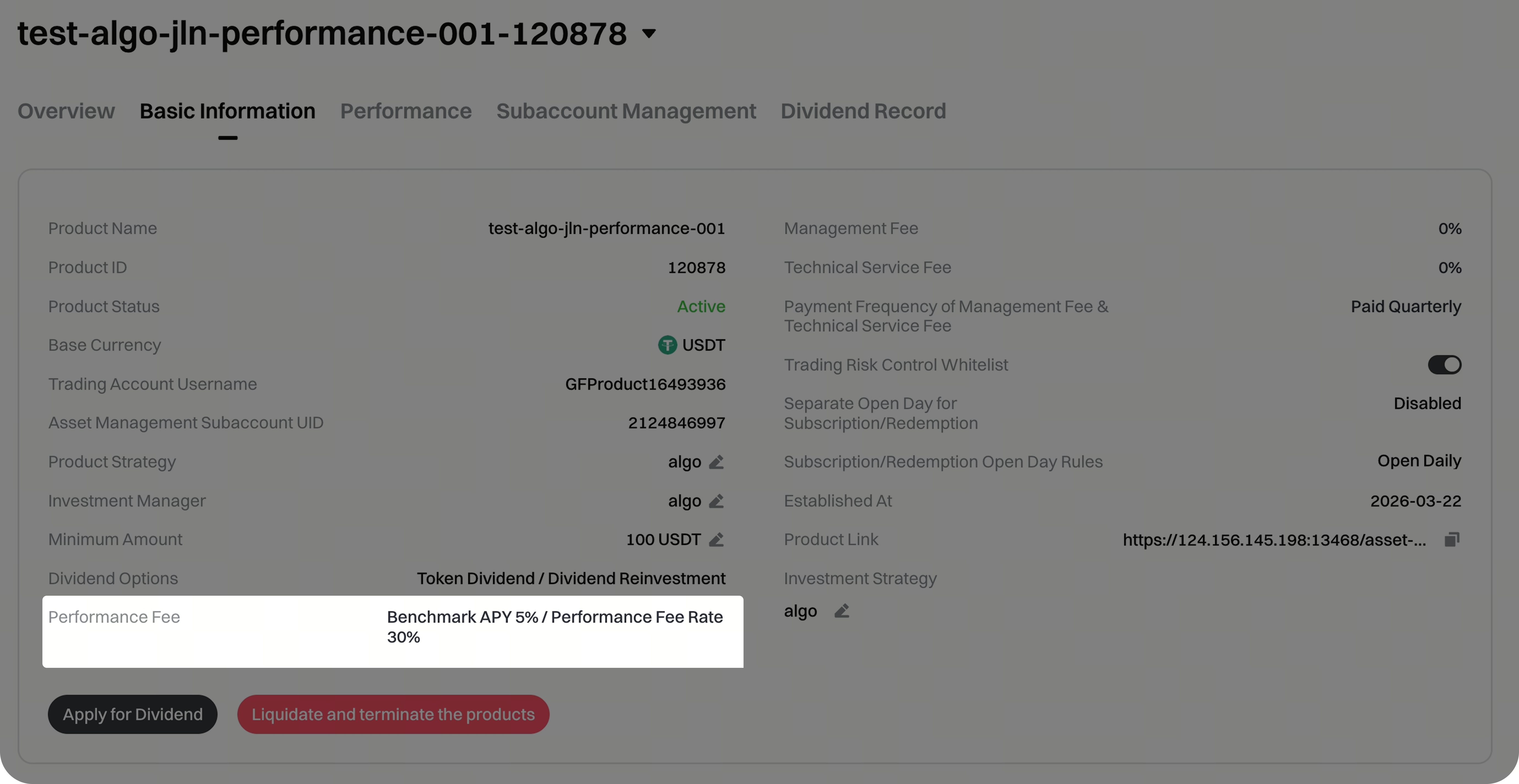
Após a criação do produto, os detalhes relativos à taxa de desempenho podem ser consultados em [Detalhes do produto] - [Informações básicas], incluindo o APY de referência e a taxa da comissão de desempenho. Estas definições não podem ser alteradas após a criação do produto.
Cálculo da taxa de desempenho
Momento da contabilização
A taxa de desempenho é cobrada automaticamente nas seguintes situações: no resgate de unidades, na distribuição de dividendos em ações, no reinvestimento de dividendos e na liquidação do produto.
Detalhes do cálculo
Condições de acumulação
Quando R ≤ B, não é cobrada qualquer taxa de desempenho.
Quando R > B, a taxa é aplicada à parte excedente.
- R: Retorno anualizado
- B: APY de referência
Fórmula
Taxa de desempenho = Número de unidades × Valor líquido por unidade × (R – B) × Dias de detenção / 365 × Taxa de comissão de desempenho
**Exemplo
Suponha que:
• APY de referência: 8%
• Taxa de comissão de desempenho: 30%
• VPL por unidade na confirmação da subscrição: 1,0
• VPL por unidade no resgate (após 365 dias): 1,2
• Unidades detidas: 100
• Retorno anualizado (R) = (1,2 – 1,0) / 1,0 × 365 / 365 × 100% = 20%
Uma vez que R (20 %) > B (8 %), o retorno excedente é de 12 %.
Taxa de desempenho = 100 × 1,2 × (20% – 8%) × 365 / 365 × 30%
= 100 × 1,2 × 12% × 30%
= 4,32
Dividendos e taxa de desempenho
Dividendo em tokens: Montante do dividendo = Dividendo bruto – Taxa de desempenho
Reinvestimento de dividendos: Unidades adicionais = (Montante do dividendo – Taxa de desempenho) / VPL após o dividendo. Mesmo que todos os investidores optem pelo reinvestimento, o gestor continuará a receber a taxa de desempenho.
Taxa de desempenho em dividendos
Etapa 1: Calcular a taxa de desempenho sobre os dividendos
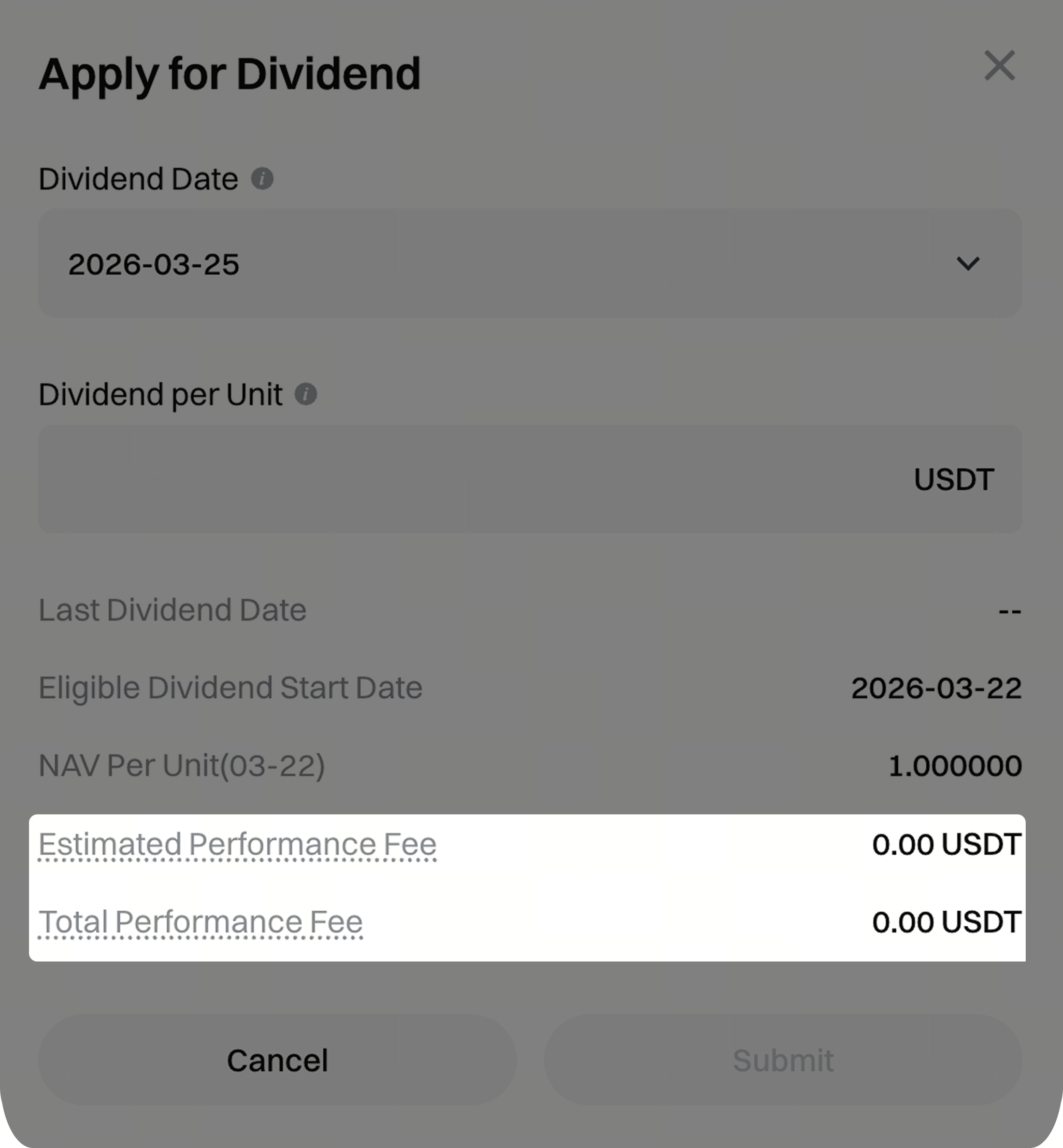
Na janela de solicitação de dividendos, em [Detalhes do produto] - [Informações básicas], estão disponíveis os seguintes campos:
Taxa de desempenho estimada: A taxa de desempenho estimada com base em todas as unidades em circulação, utilizando o VPL mais recente e o dividendo por unidade indicado. (Dica: A taxa de desempenho estimada para esta distribuição de dividendos)
Taxa de desempenho total: A taxa de desempenho total, partindo do princípio de que todas as unidades são totalmente resgatadas ao VPL mais recente. (Dica: A taxa de desempenho total de todas as unidades atuais dos produtos. Após uma distribuição de dividendos bem-sucedida, o cálculo da taxa de desempenho para as unidades restantes será reiniciado a partir da data de pagamento dos dividendos.)
Etapa 2: Ver a taxa de desempenho sobre os dividendos
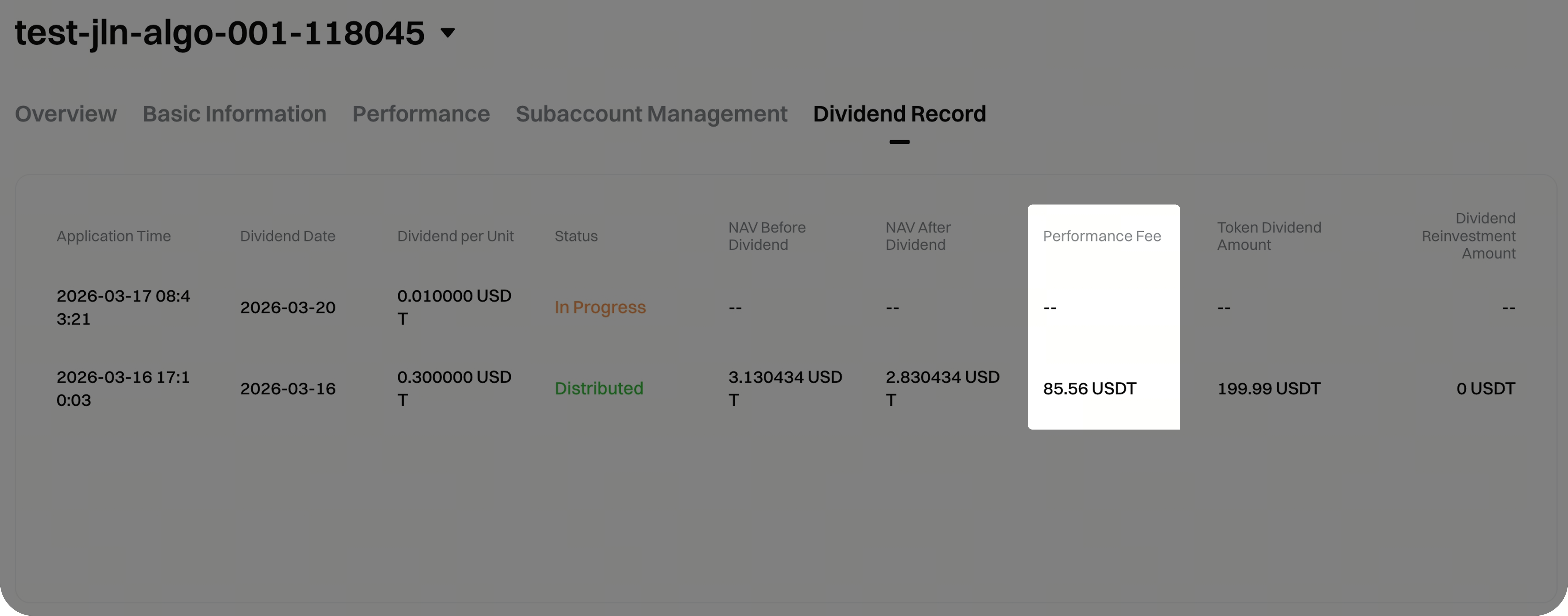
Em [Detalhes do produto] - [Registo de dividendos], pode consultar a coluna [Taxa de desempenho].
Taxa de desempenho nas transações
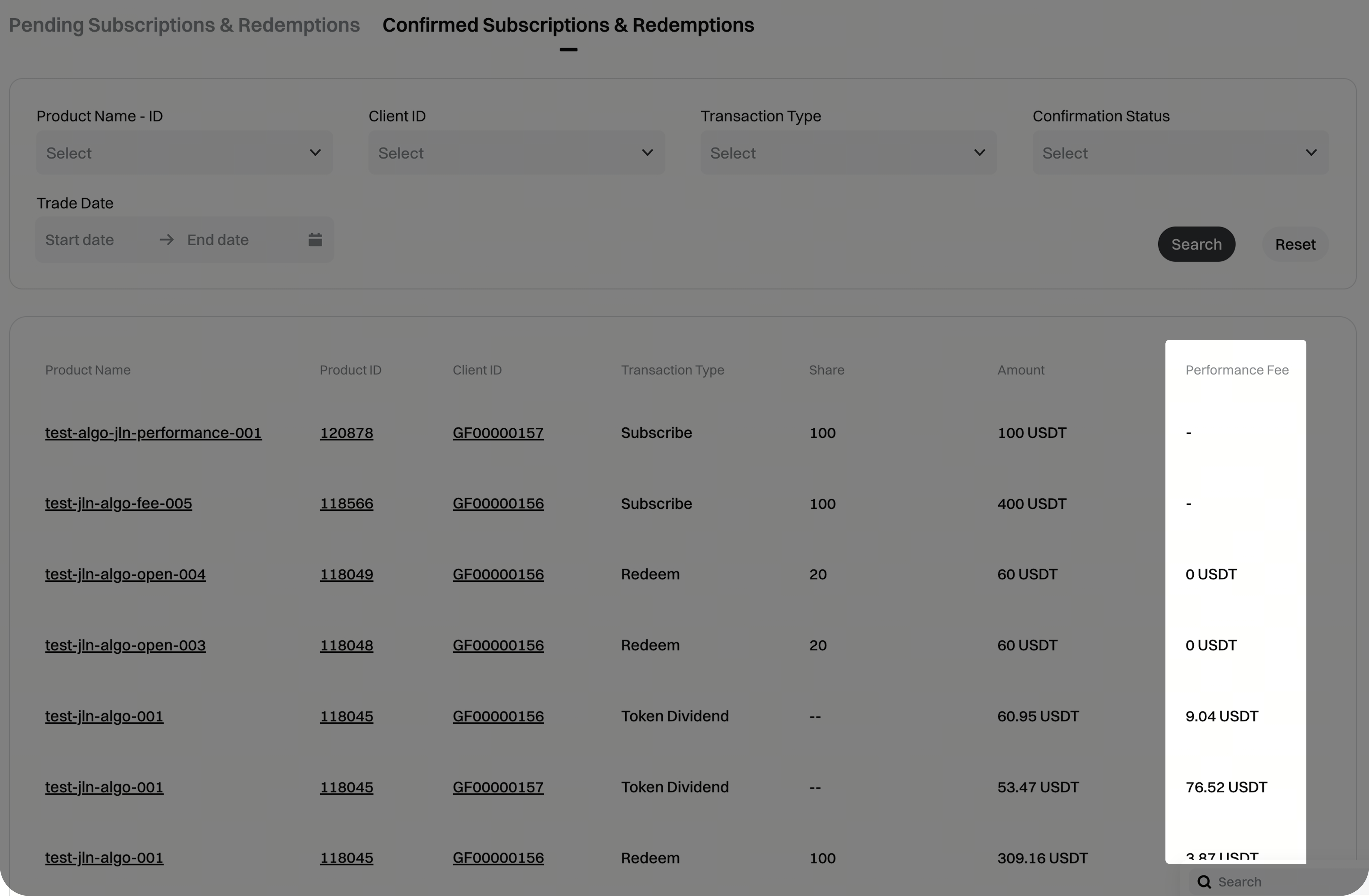
Em [Subscrição e Resgate] - [Subscrições e Resgates confirmados], a coluna [Taxa de desempenho] apresenta:
- Subscrição: Exibido como "–" (não é cobrada qualquer ztaxa de desempenho)
- Resgate / Liquidação / Dividendo / Reinvestimento de dividendos: Apresentado como o montante da taxa de desempenho
- Se a taxa de desempenho for 0, é apresentada como "0"
- Se a taxa de desempenho não estiver ativada para o produto, será apresentada como "–"
Perguntas frequentes
P1: A partir de quando começa a acumular-se a taxa de desempenho?
R: A taxa de desempenho só é cobrada quando o retorno anualizado do investimento excede o APY do índice de referência. Por exemplo, se APY de referência for fixado em 8%, não será cobrada qualquer taxa quando o retorno anualizado for ≤ 8%. Apenas a parte excedente está sujeita à taxa.
P2: É possível alterar os parâmetros da taxa de desempenho após a criação do produto?
R: Não. As definições da taxa de desempenho não podem ser alteradas após a criação do produto. Verifique cuidadosamente o APY de referência e a taxa de comissão de desempenho ao criar o produto.
P3: O reinvestimento de dividendos gera taxas de desempenho?
A: Sim. Mesmo que todos os investidores optem pelo reinvestimento de dividendos, o gestor continuará a receber a taxa de desempenho correspondente.
P4: Como posso consultar o valor da taxa de desempenho de uma transação específica?
R: Em [Subscrições e Resgates] - [Subscrições e resgates confirmados], cada registo de resgate, liquidação, dividendo e reinvestimento de dividendos apresentará o montante correspondente da taxa de desempenho.
Isenção de responsabilidade
O conteúdo aqui disponibilizado destina-se apenas a fins de referência e educativos, não constituindo qualquer aconselhamento financeiro, de investimento, de negociação ou jurídico, nem representa uma oferta ou solicitação para comprar ou vender quaisquer ativos digitais. A Gate não assume quaisquer declarações ou garantias, expressas ou implícitas, quanto à exatidão, integridade ou atualidade das informações aqui contidas. As funcionalidades dos produtos, interfaces, regras e estruturas de comissões podem ser atualizadas ou ajustadas a qualquer momento. Consulte os anúncios mais recentes e a informação efetivamente apresentada na plataforma Gate para obter os dados mais precisos.
Os investimentos em ativos digitais envolvem riscos significativos, podendo os preços variar substancialmente. Existe a possibilidade de perder a totalidade do montante investido. Tome decisões de forma cautelosa, tendo em conta a sua situação financeira e tolerância ao risco, após compreender plenamente os riscos associados. Se necessário, recomenda-se consultar um consultor financeiro ou jurídico independente.
Para mais informações sobre potenciais riscos, consulte a Divulgação de Riscos e o Acordo de Utilizador da Gate.
